
Shop floor time tracking: real production times, scanned at the workstation.
Planitrack records every operation, by operator, with a barcode scanner or a phone, and you schedule manufacturing orders by drag and drop. By the evening, you know where the time went, and it goes back into your ERP without re-keying.
Free trial · full user guide · connects to any ERP, works with Excel
Monday morning
Does this sound like your shop floor?

Time sheets re-keyed on Monday
Unreadable time sheets, copied into Excel, and hours that never quite match the manufacturing orders.

The standard nobody checks
A standard time estimated six years ago and still used for quotations. Nobody knows what it is worth today.

“Who is working on what?”
To find out, someone walks round the shop floor. Miles up and down the aisles, and a late manufacturing order with no idea where the time went.
In two minutes
See Planitrack in action
The workstation and its list of operations, badge identification, attendance turning green live, the quantity declared at the end of an operation, the next workstation seeing the operation appear, the work instructions to hand, the recorded times, the manufacturing order record and the utilisation rate per operator, recorded in the application with a demo data set.
At the workstation
Made for gloves, noise and a metre of distance
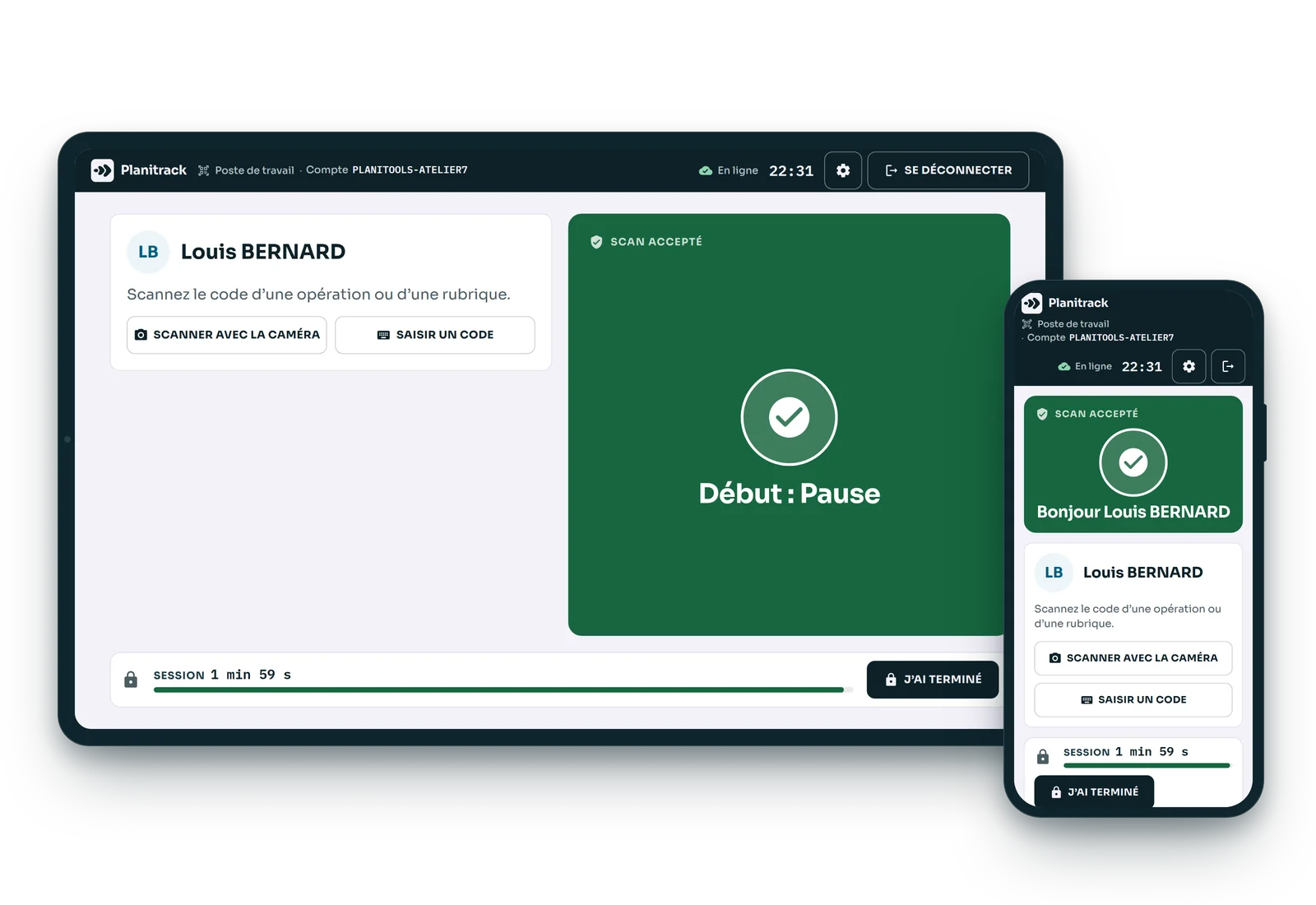
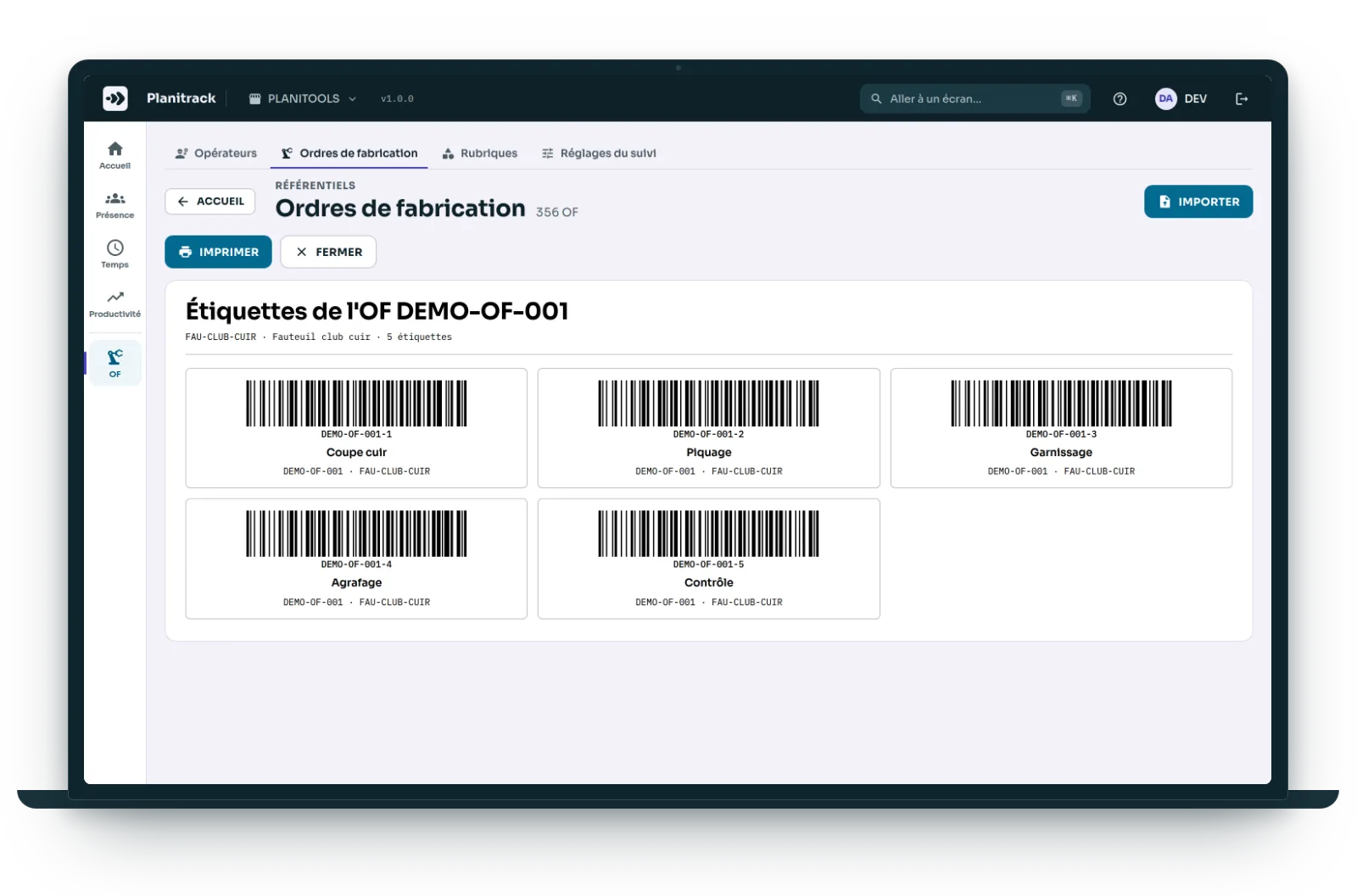
The manufacturing order labels are printed from Planitrack, one per operation. At the workstation, one scan is enough: the result can be read from a distance.
- An off-the-shelf barcode scanner, or the camera of a phone or tablet, with nothing to install.
- Identification by badge, by employee number and PIN, or by typing your name.
- Pause and resume; time categories for set-up, cleaning, waiting for material.
- Three-shift working: a night shift that runs past midnight stays a single day.
- The product drawing and the work instructions for the operation open at the workstation.
In real time
Who has arrived, and who is on which order
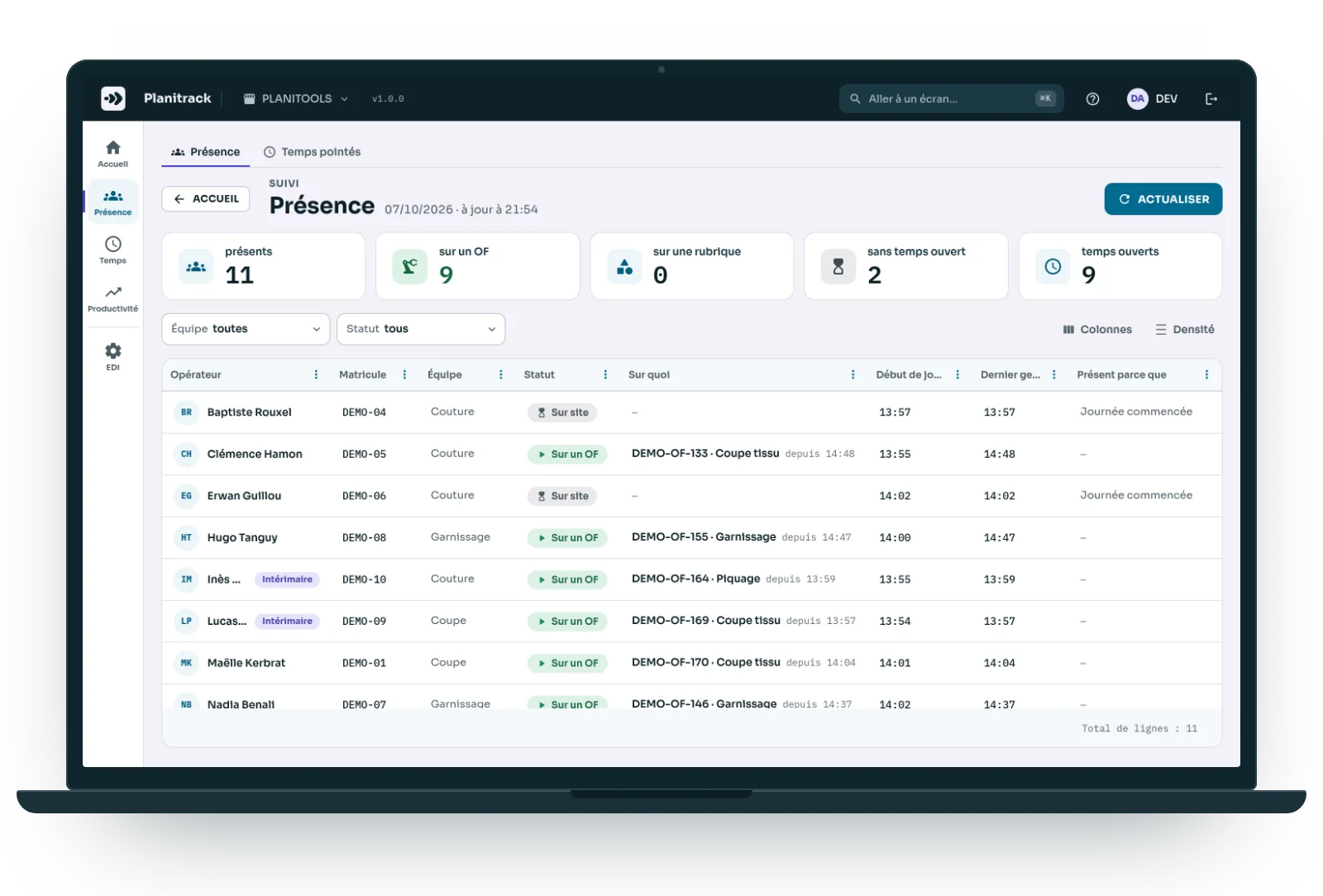
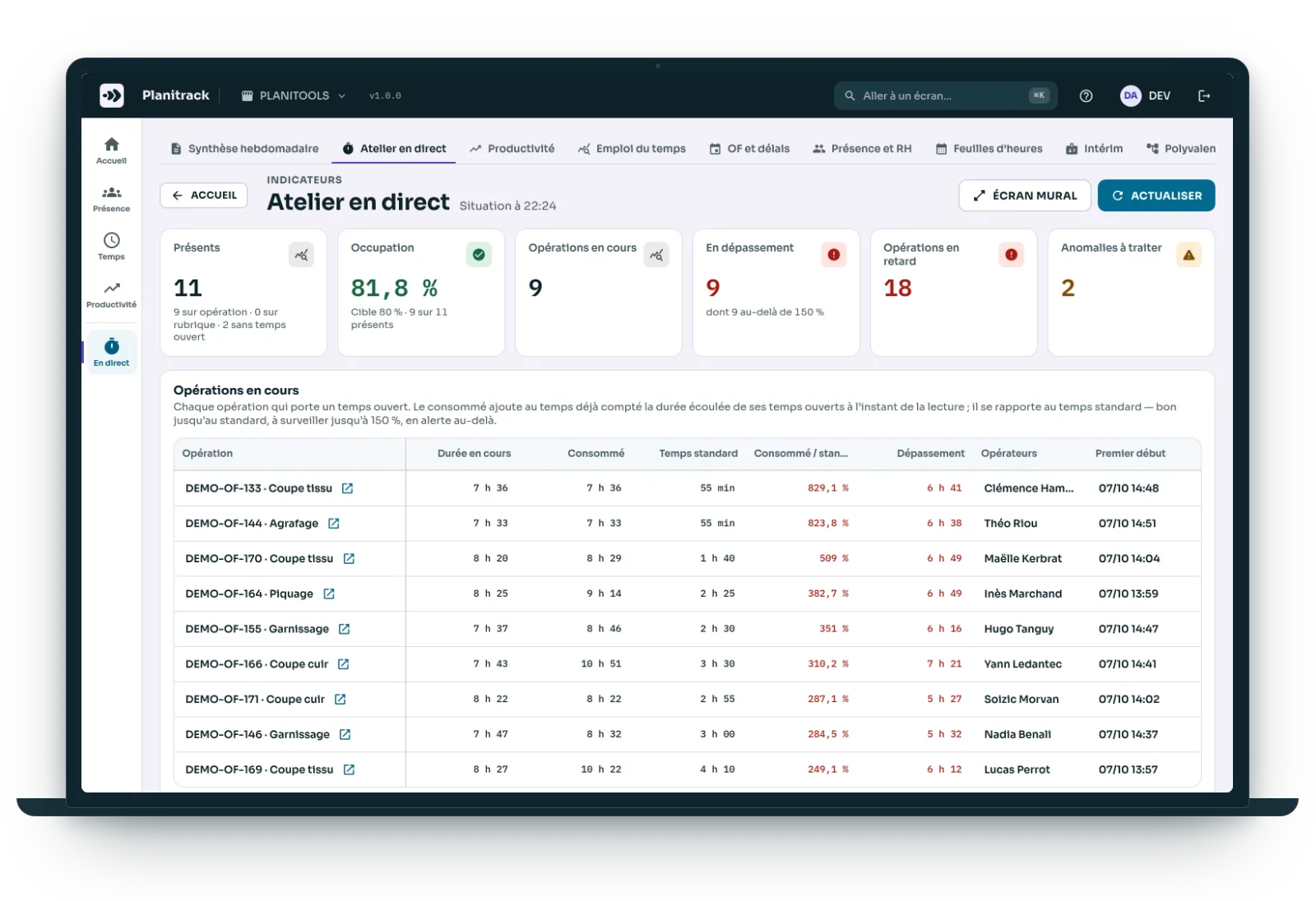
Look at the screen, not the aisles. The Attendance screen updates itself with every scan: arrivals, departures, and every manufacturing order started, with its time.
- Present, on an order, on a time category, with no open time: five figures at the top of the screen.
- For each person: the current operation, since what time, and their last action.
- A wall screen for the shop floor: operations in progress, overruns, delays.
- Each operation's stopwatch against its standard time.
Scheduling
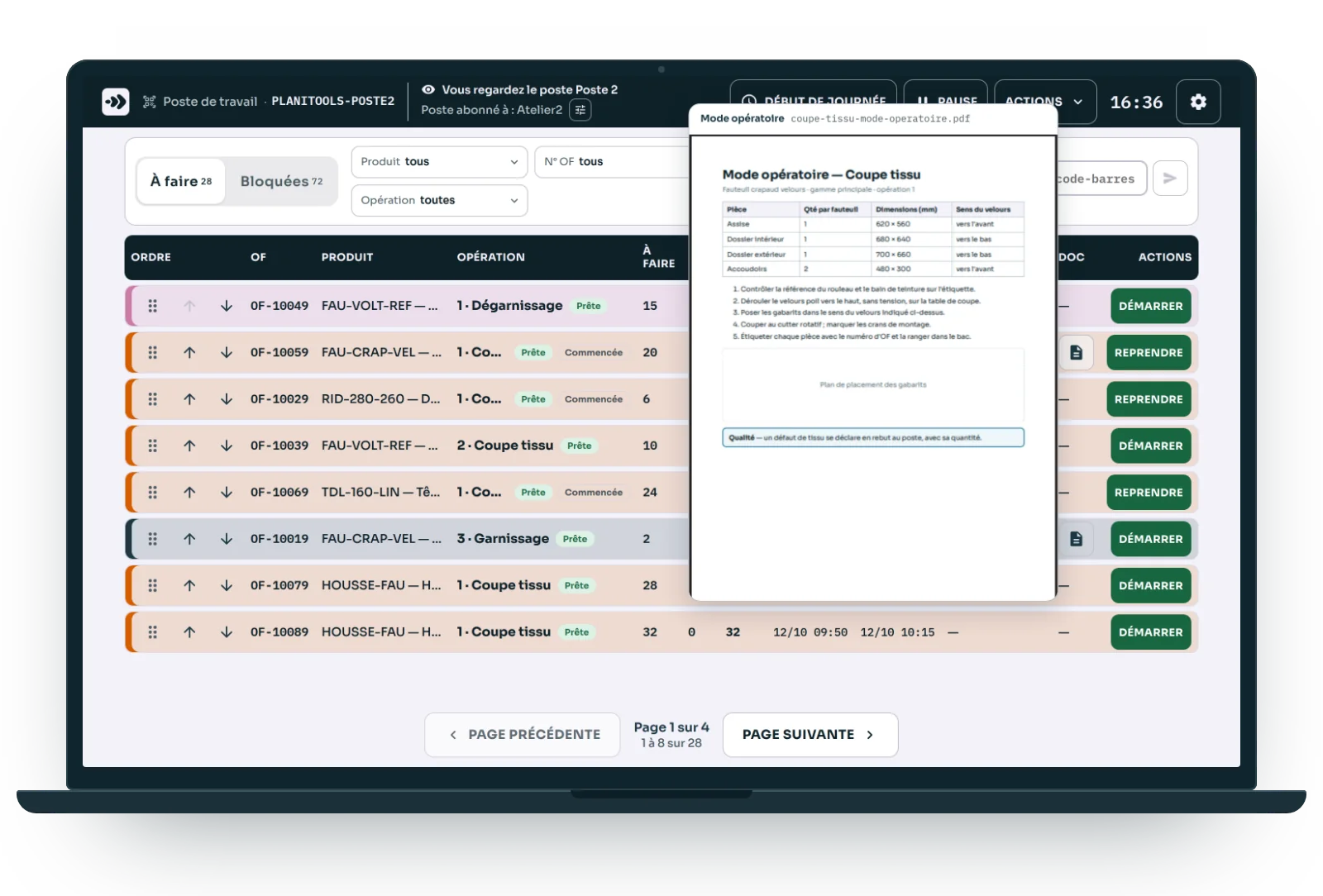
Scheduling manufacturing orders: a customer chases, and the sequence changes with a drag and drop
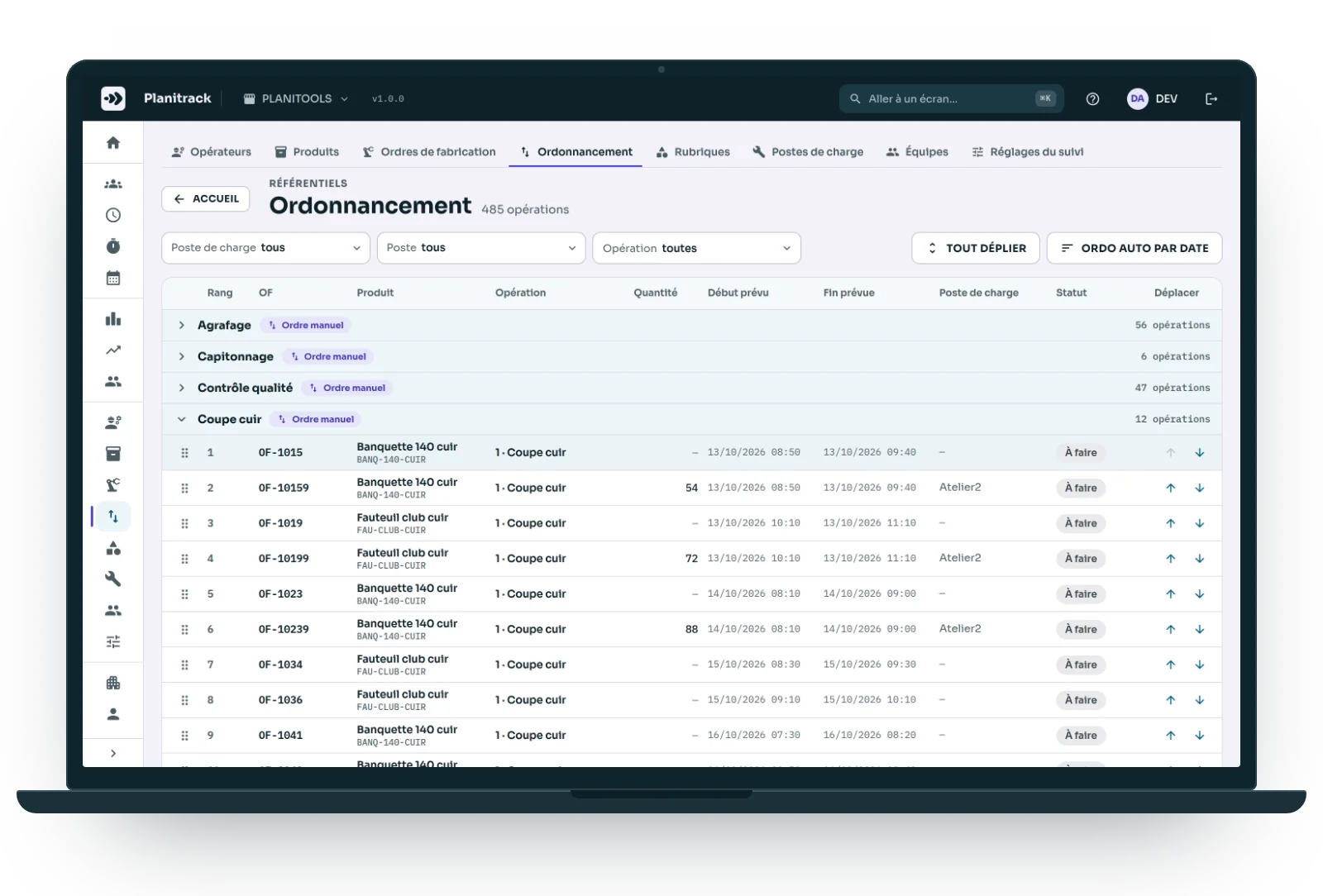
A call from a salesperson, an email from a customer: you used to reshuffle the paper orders by hand, machine by machine. Here, you drag the order into place, and the work centre sees it in its queue straight away. Nobody has to walk over, and you know which order everyone is working on.
- The operations to do, by operation type, by work centre or by workstation.
- Drag and drop, or “Move up” and “Move down”: the sequence is saved immediately.
- A “Manual order” badge; “Auto-schedule by date” goes back to the planned dates.
- A workstation's queue can also be reordered directly from its own screen.
When the order is released
The right document, in front of the operator
The product drawing and the work instructions for each operation travel with the manufacturing order. At the workstation, the operator opens them from their queue, without hunting for the binder or the latest version.
- One PDF per product, and one set of work instructions per routing operation.
- Rest the mouse on the button for a second: a preview opens alongside, and you can scroll through it.
- One click opens it full-size; replace it on the product record, and every workstation has the new version.
At your own pace
From simple time tracking to full production tracking
Start with times only. Quantities, scrap and costs are switched on with a setting, when the shop floor is ready.
Times, in light mode
A badge, an operation, a time. Nothing else to enter: timesheets and productivity follow.
Quantities and scrap
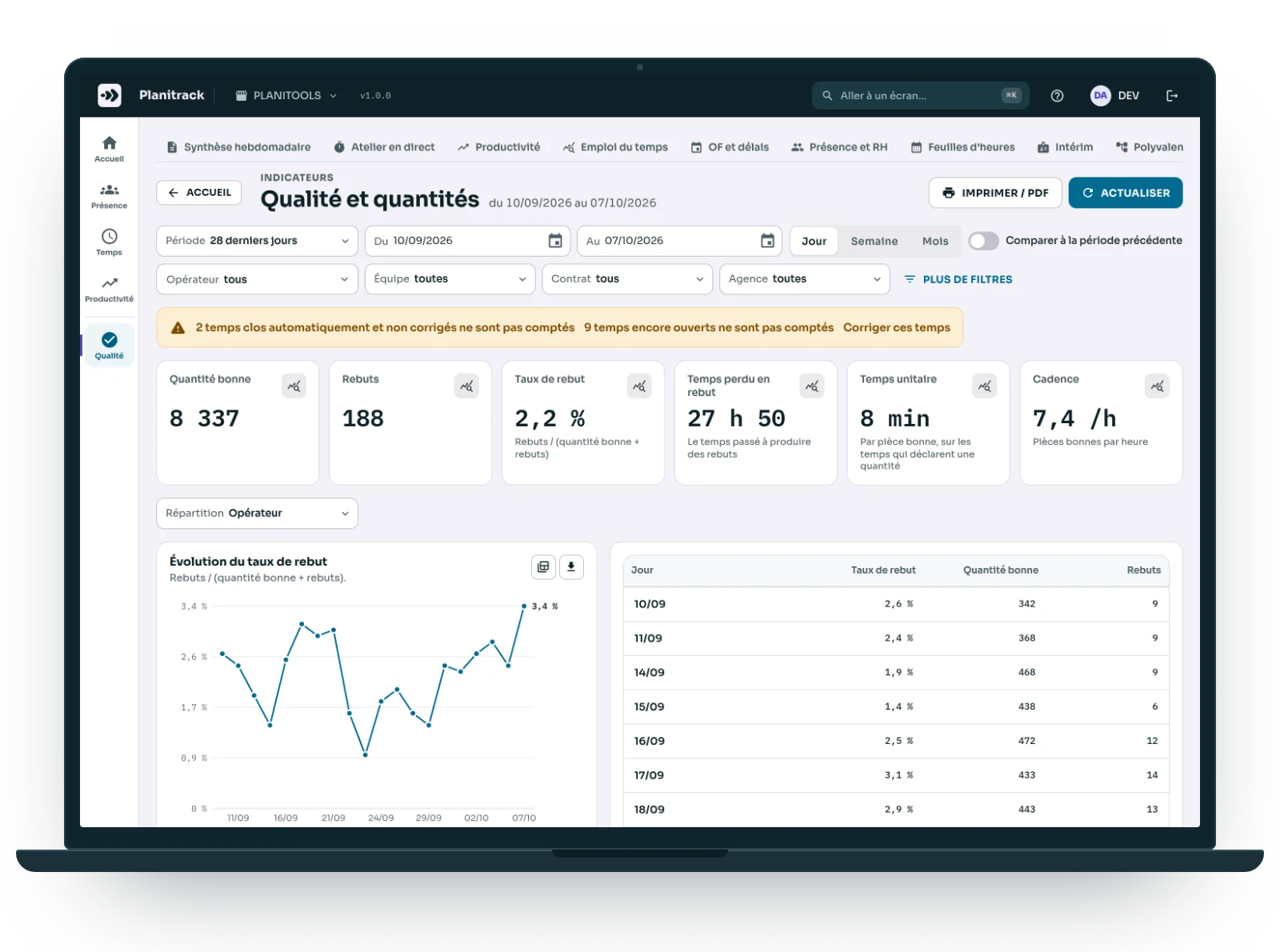
When an operation stops, the operator declares good parts and scrap. Scrap rate, throughput rate and time lost to scrap are calculated automatically.
Costs
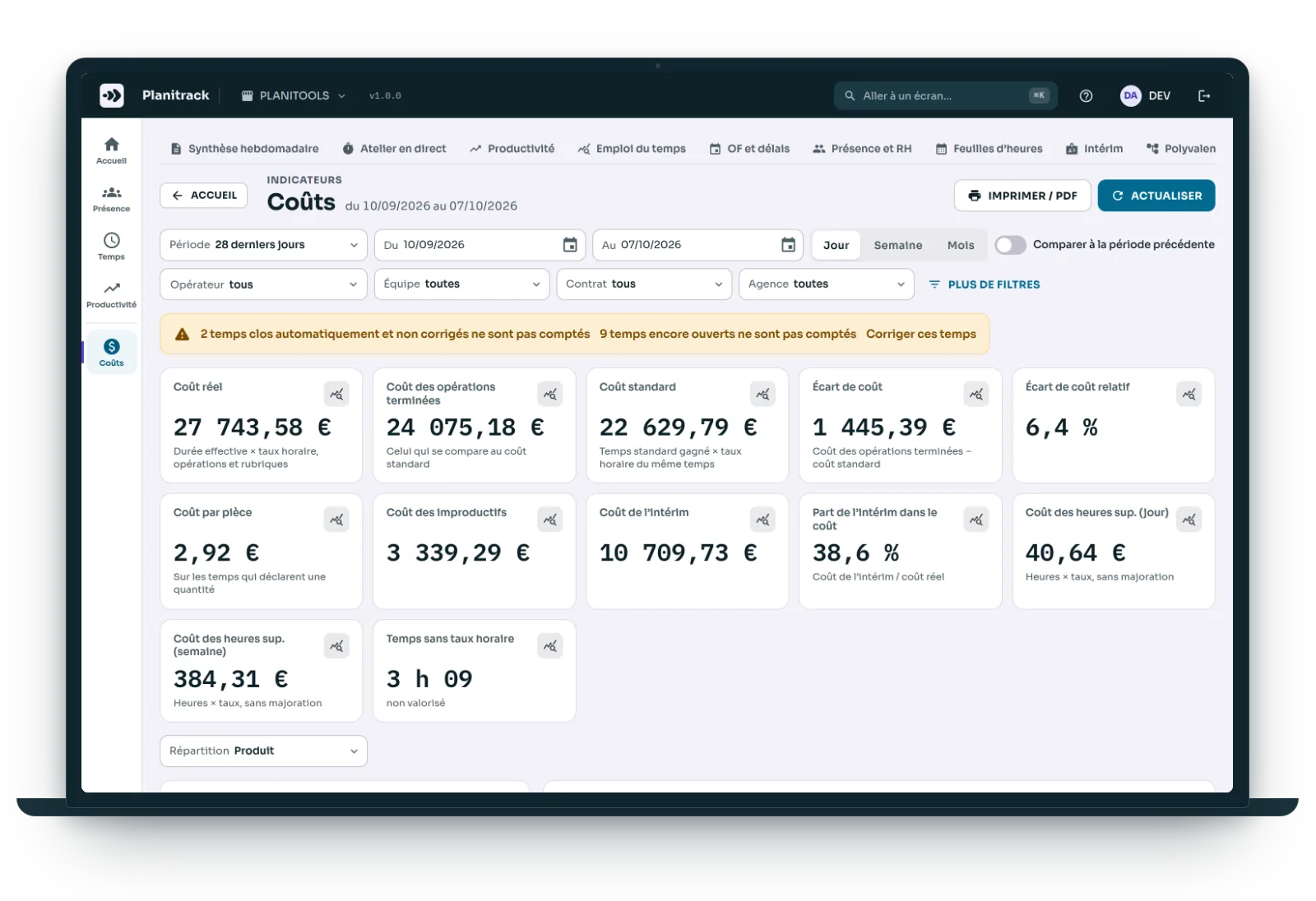
An hourly rate on each operator's record puts a value on their time: actual cost against standard cost, cost per part and per manufacturing order.
105 measures, 11 dashboards
From times to decisions
Management
The weekly summary and the twelve-week trend: hours recorded, efficiency, orders delivered on time. Emailed to you on Monday if you wish.
Productivity
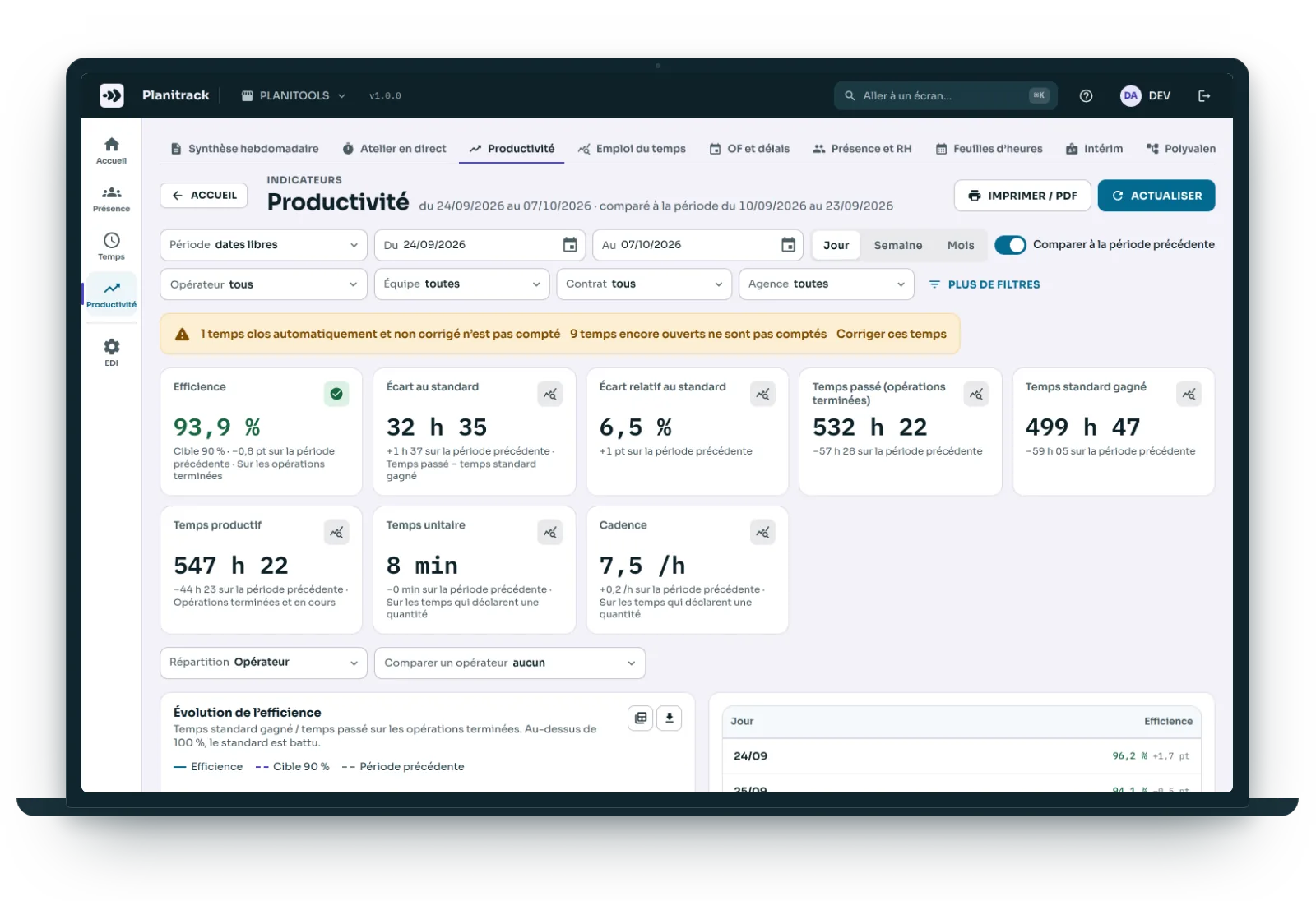
Efficiency, variance against standard, Pareto of drifting operations, learning curve. Planitrack suggests an observed standard time based on the latest runs.
Delivery
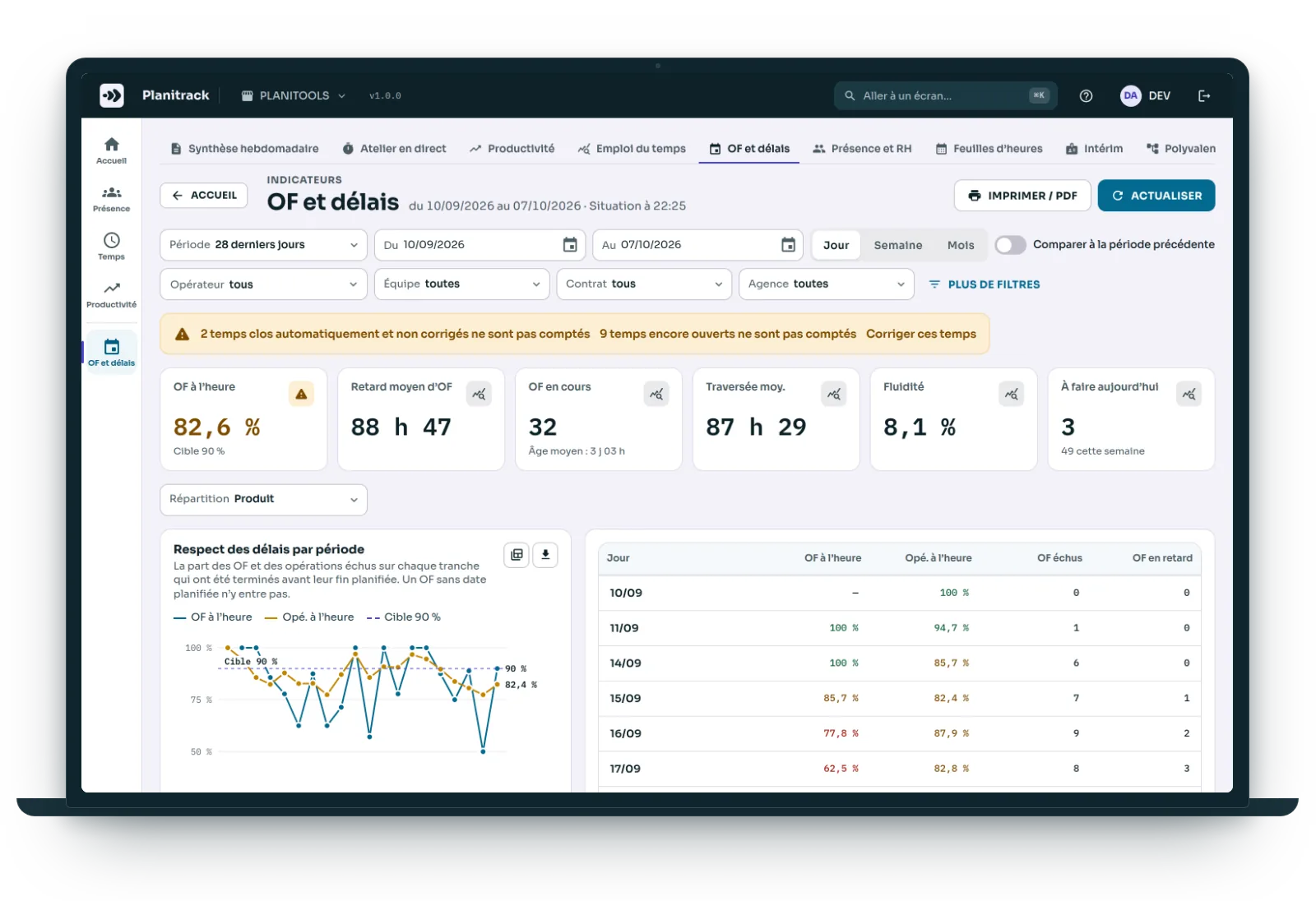
On-time delivery, throughput time, bottlenecks, remaining work against observed capacity, planned versus actual Gantt chart for each order.
HR and payroll
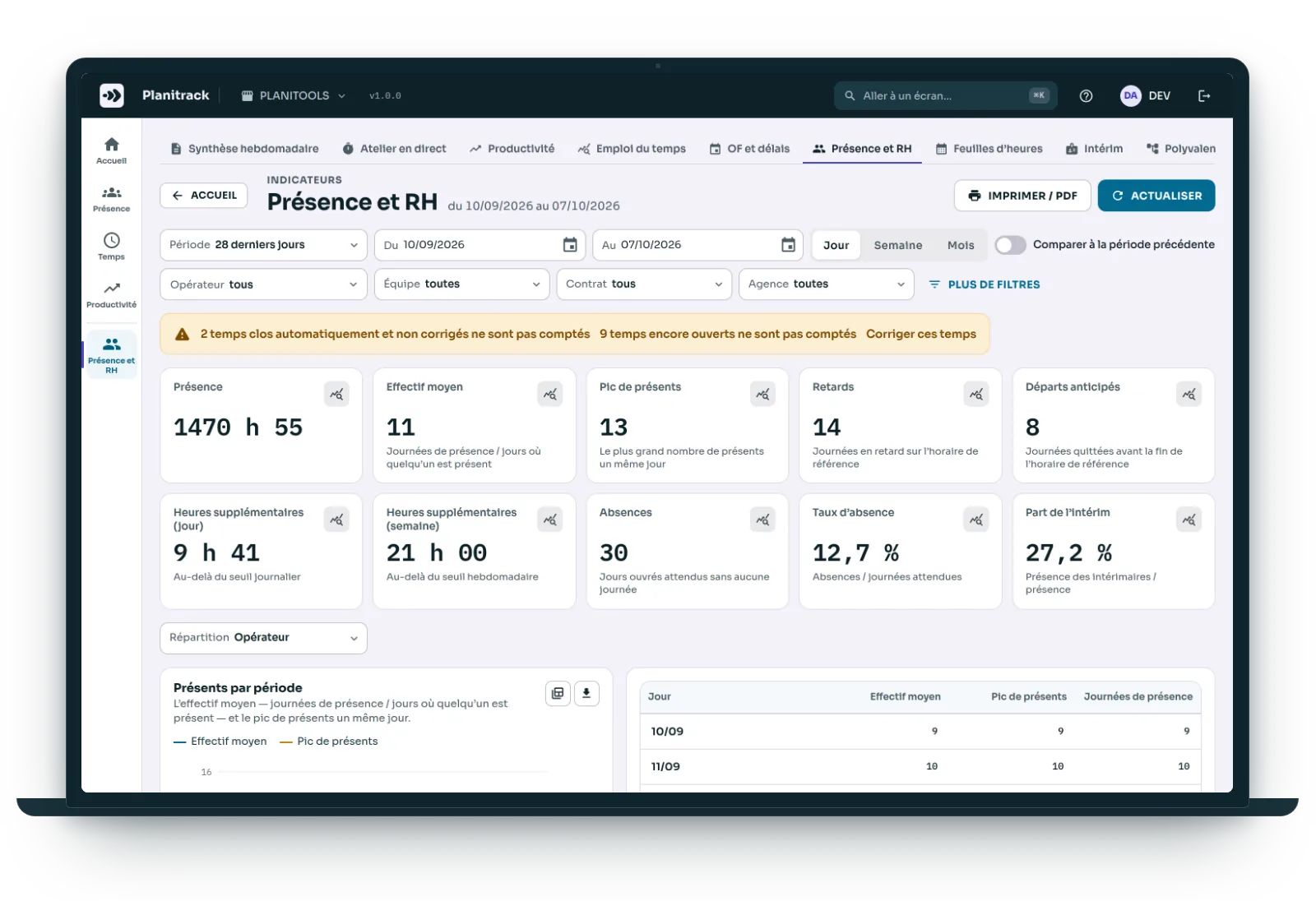
Timesheets ready on Friday, temp worker hours by agency, late arrivals, overtime, the observed versatility of each operator.
Costs and quality
Actual cost against standard cost, cost per part, scrap declared at the workstation. A shrinking margin shows up operation by operation.
What Planitrack measures for you
105
measures ready to use
11
dashboards
1 scan
= 1 time entry logged
0
re-keying into the ERP
Connects to your ERP, or to Excel
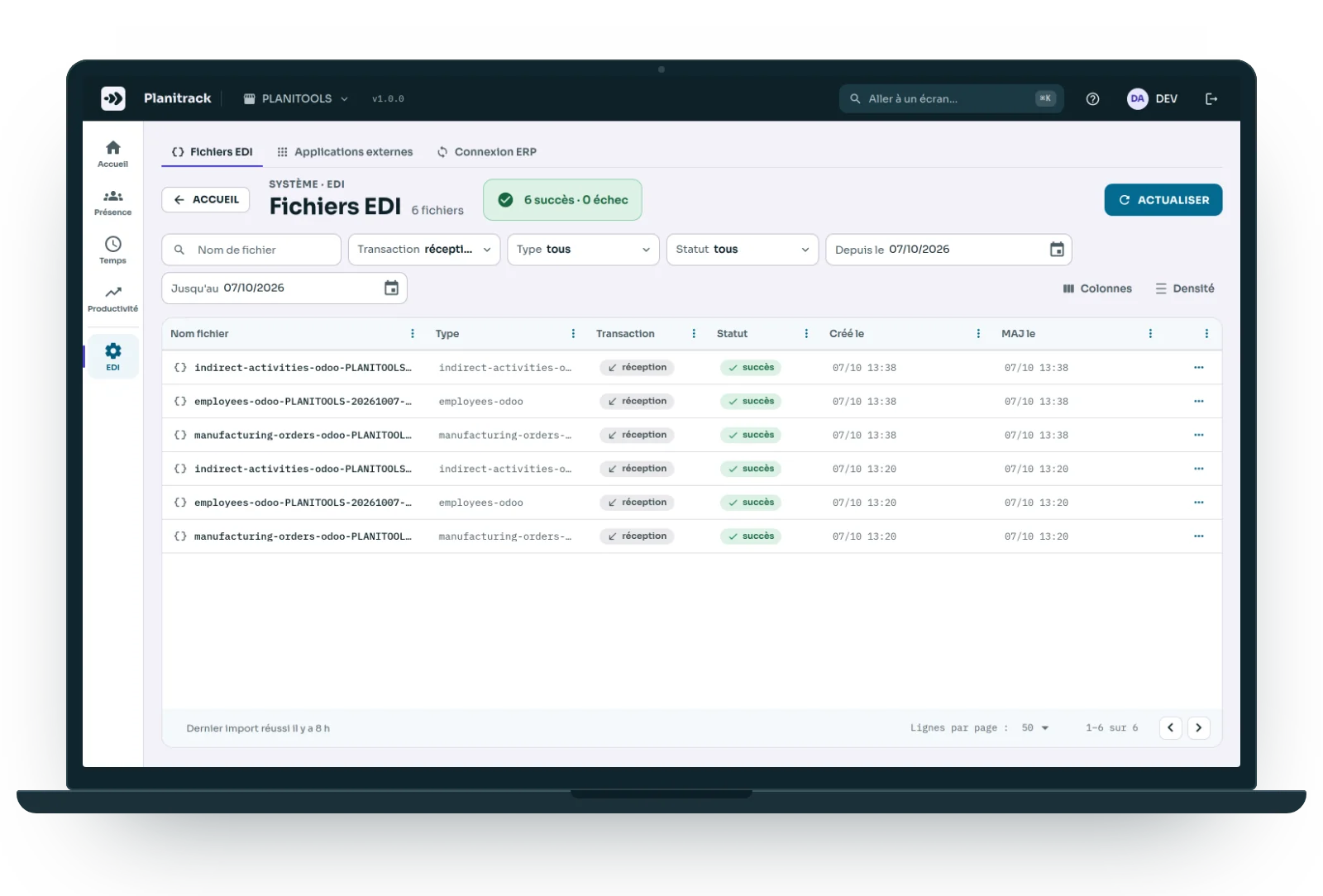
Planitrack connects to any ERP: manufacturing orders, their operations, employees and time categories come in every day, and times go back once, with no duplicates.
- Odoo: the connector is ready to use.
- Another ERP: we connect its exports, or it uses Planitrack's public API.
- No ERP: an Excel workbook you can re-run, with a line-by-line report.
- Every exchange leaves an EDI trace that can be reviewed and replayed.
AI agent
Ask your shop floor
“Which orders drifted this week?” “Who is multi-skilled on the sewing workstation?” The AI agent reads your indicators and answers in plain language.
- Read-only: it looks, it changes nothing.
- Your own key, with the provider of your choice: Anthropic, Mistral or OpenAI.
- Limits and a monthly budget set company by company.
- An MCP server to query it from your own tools.
- An option, offered on trial first.
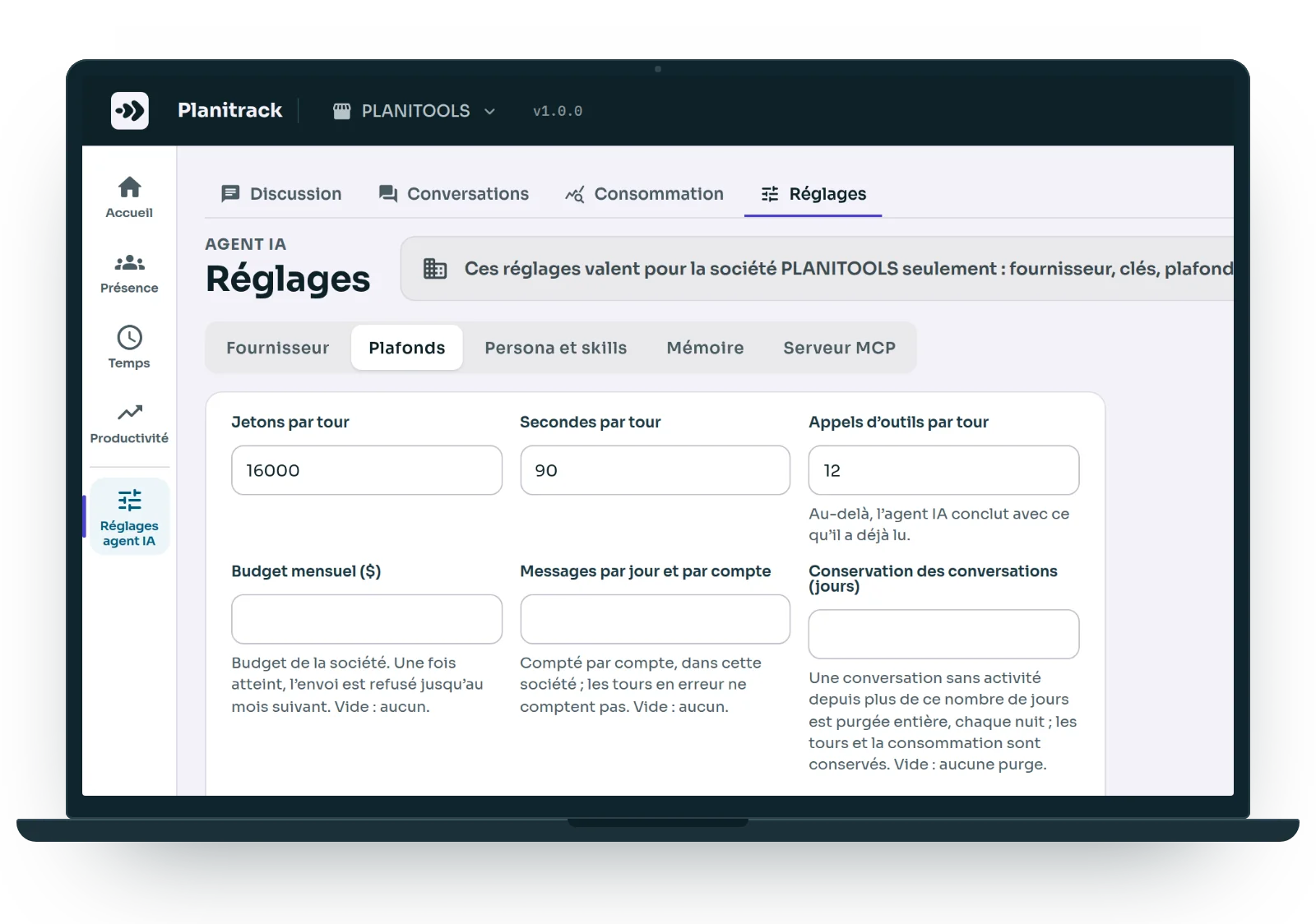
Budget
Cheaper than a planning mistake
Better value than adding headcount. How it works: a demo, a free trial, a scoping phase, a pilot workstation that we set up with you, then a subscription.
An ERP manufacturing module
- Module licence, then per user
- Around fifty days of implementation
- Terminals and training on top
Planitrack
- Hosted, updates included, lower recurring cost
- Set up with you, one pilot workstation first
- Off-the-shelf barcode scanners, phones, tablets
- Free trial, illustrated user guide
Ballpark figures for illustration only, not a price list or a quotation: the estimate is based on your shop floor.

Your questions
The ones we are asked before every demo.
Planitrack connects to any ERP. For Odoo, the connector is ready; for another ERP, we connect its exports or it uses the public API. Without an ERP, manufacturing orders come in through an Excel workbook you can re-run, or are entered from the routing.
A pilot workstation in a few weeks: your orders imported, badges and labels printed, one workstation equipped. Then we extend it, work centre by work centre.
A badge, a scan, a screen that says green or red. No menus, no keyboard. And anyone who has forgotten their badge just types their name.
That is often where it starts. Planitrack suggests an observed standard, calculated from the latest runs: you then decide whether to adopt it.
Each company is kept separate, each account has its role, and every time correction keeps its history and its reason. Backups, and Excel and PDF exports at any time.
They stay. Orders are imported from Excel, every table can be exported, reports go out by email. Planitrack replaces the time sheet, not your spreadsheet.
Each temp worker has their agency and assignment dates: outside the assignment, their scan is refused. Night shifts that run past midnight stay a single working day.
Yes: you can try Planitrack free of charge, before any commitment. An illustrated user guide comes with the application, in the Help menu, and the AI agent reads it to answer your questions about a screen or a button.
One point of contact, from the ERP to the shop floor
Your ERP at the centre, our tools around it: designed by Planitools, on the same items, the same work centres and the same routings. Data flows through the ERP or through Excel. No need to get three suppliers to agree.
Planiprod
MPS, MRP, load and constraints in tables where every column can be programmed and explained.
Planiprev
Demand forecasting item by item, projected stock and shortages, with an AI agent.
Odoo integration
Odoo Learning Partner, certified v19: we configure the ERP and connect our tools to it.
Demo
Show us your shop floor, and we will show you Planitrack.
Describe your workstations and how you record time today: the demo runs on a shop floor that looks like yours.
- A demo, by video call or at your site.
- A free trial, with the user guide.
- A scoping phase: your orders, your workstations, your time categories.
- A pilot workstation, set up with you.
- Tailored integration, once the pilot has convinced you.
Reply within 48 working hours, from the team that builds the tool.
How it works
Three actions, no training course
1
Orders come in
Imported from your ERP or from Excel, or created by hand from the product routing. Each operation gets its own barcode, and scheduling is done by drag and drop.
2
The operator scans
Their badge, then the operation. The screen answers full-size: green means accepted, red means refused, orange means check. With sound and vibration.
3
You read
The shop floor live, the weekly summary, the timesheets. Without re-keying anything.