
Replacing a WMS without stopping the warehouse means knowing, at a given moment, exactly what it contains. For a manufacturer of industrial joinery, we designed an inventory module within their production management software for this purpose: a scan-based, multi-pass counting tool that was used to check the data migrated from the old system and to secure the cutover. This case study describes the choices made and the lessons learned.
Background: an ageing warehouse system
The company, which specialises in industrial joinery, ran its warehouse with an old WMS (Warehouse Management System), developed in Delphi, that no longer met its traceability and flow management requirements. Replacing it had become a priority, even though the new web-based production software did not yet cover the entire manufacturing flow. Operators were equipped with Zebra mobile terminals, and parcel labelling relied on cloud-connected Zebra printers.
The problem: migrating without certainty
The challenge was twofold: keep operations running during the transition, and guarantee data integrity between the old and the new system. The history of parcels, pallets and locations had to move from an SQL database to a document database, with no certainty that everything the old WMS showed still physically existed. A full inventory, with proper tooling, was the only way to validate the migration before switching over.
What we built: an inventory module within the production software
Migrating the data
We first extracted the data from the old software's SQL tables, then wrote a migration script to the new production software's NoSQL MongoDB database. This was not a straight copy: moving from a relational model to a document model required a complete mapping, a reorganisation of the structures to make use of the new features, and enrichment of the data with the contents of each parcel, information the old system did not hold. In parallel, scripts generated the missing customer orders, locations and pallets, so that each parcel could be correctly linked to them.
The inventory module
Given the uncertainty over the migrated data, the inventory module became the heart of the cutover. It does more than count: it synchronises the two systems and guarantees that the data is accurate at the moment of switchover. Its functions, in the order of an inventory:
- Creation and initialisation. A full copy of both systems' data into a dedicated inventory table; access to the WMS locked, with a real-time WebSocket notification when counting starts, to prevent any concurrent changes.
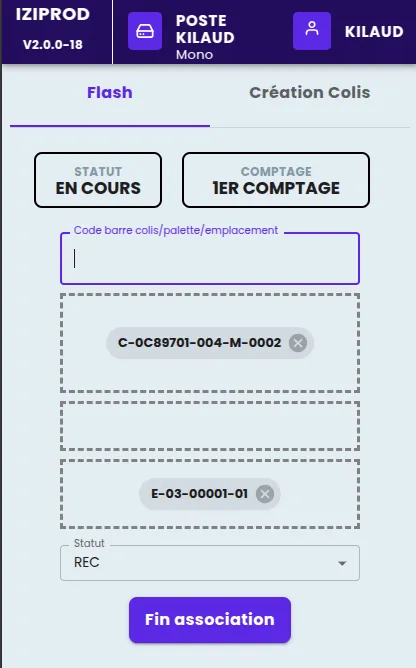
- Scan-based counting. Scan each parcel on the pallet, scan to confirm the complete pallet, then scan the location to confirm where it is. An unrecognised parcel can be created directly during the inventory.
- Real-time dashboard. Number of parcels to count, number counted, discrepancies found, percentage complete; traceability of operations by operator; an administration interface to correct a record.
- Multiple counts. A first reference count; an optional second count on selected lines, with the first one frozen; a third to settle persistent discrepancies. Recount requests are sent to operators through an automatically printed PDF.
- Operator interface. A responsive application on the Zebra terminals, with a deliberately simple sequence of scans.
Closing the inventory
At closing, a script goes through every counted line and updates the WMS tables using a clear priority rule: the value of the third count if there is one, otherwise the second, otherwise the first.
A deliberate trade-off to meet the deadline
To meet the urgent deployment of the new WMS, we deliberately dropped the automatic assignment of lines to each operator. This choice sped up go-live without reducing counting efficiency.
Results of the inventory-led cutover
- a secure transition between the old and the new system;
- validation and correction of the migrated data, line by line;
- real-time visibility of inventory progress;
- a significant reduction in the risk of stock management errors.
What we take away from this project
An inventory is the best test of a migration. No reconciliation of tables replaces physically going past every pallet. This is what made it possible to validate, then correct, the migrated data.
Lock the system during the count. An inventory of stock that keeps moving is worthless. Blocking the WMS through a WebSocket notification is technically simple and essential.
Count several times, freezing each pass. Three counts with priority to the most recent give a reconciliation rule everyone understands, and avoid arguments at closing.
Deliver what matters, quickly. Giving up a convenient feature (automatic assignment) to hold a cutover date is often the right choice. What happens when the conditions for a cutover are not met is covered elsewhere (see our other lessons-learned article). For choosing barcodes and terminals, see our guide to barcodes in production.
Where this stands today
This need is now covered as standard by the Odoo Inventory app: locations, parcels and pallets, cycle counts and scan-based counting on a mobile terminal, which we set up as part of our Odoo integration for manufacturing. On the shop floor, Planitrack tracks manufacturing orders with a handheld scanner, and the hub page simple production management software for SMEs presents our full offer. Request a demo from us.