
A joinery manufacturer wanted to run its entire production flow in custom web-based production management software, without re-keying what already existed in its ERP. This case study describes how we connected the production software to the Diapason ERP through file exchange on an SFTP server, in the absence of an API, and what we learnt while stabilising that flow.
Background to the Diapason integration
The company makes doors and windows and manages its quotes, orders and technical data in Diapason, an ERP specialised in this sector. Production, however, was to be run in new production management software: releasing manufacturing orders, tracking operations, checks, progress. An in-house DBA administered the manufacturer's servers, including the SFTP server that would be used for the exchange.
The integration problem: no API
The goal was clear: not to recreate in the production software data that already existed in the ERP (items, orders, bills of materials, work orders), but to use it to build a production flow suited to the shop floor, and to send that flow's progress back to the ERP. Diapason, however, offered no web API. What was needed was a reliable, two-way interface between the production software and the ERP that could be monitored, built solely from file exports and imports.
What we built: production software connected to the Diapason ERP over SFTP
An EDI flow defined file by file
- Identification of the data the production software needs, screen by screen.
- Work with the ERP team to extract this data and generate the matching files, in XML format.
- A sending frequency defined for each file.
- Strict file naming rules, so that anyone can see at a glance what a file contains and when it dates from.
- Agreed exchange directories on the SFTP server, for each direction.
In total, the two-way flow has 11 files sent by the ERP to the production software and 5 files sent back by the production software to inform the ERP of production progress.
An integration module in the production software
The SFTP server remained under the manufacturer's DBA. On the production software side, we developed a dedicated module that handles the connection (host, user, password, port) and applies the same sequence to every file received: download by a scheduled task, conversion of the XML to JSON, update of the production software's database, error handling, then deletion of the processed file.
A monitoring screen for the business team
So that users would not have to call on a developer at every doubt, we added a screen to monitor the exchanges. It shows whether the ERP has sent the expected files, displays their content to check that it conforms, identifies the errors raised by the production software during integration, and lets a file be replayed in a test environment. In parallel, the ERP team receives an e-mail alert for every integration problem.
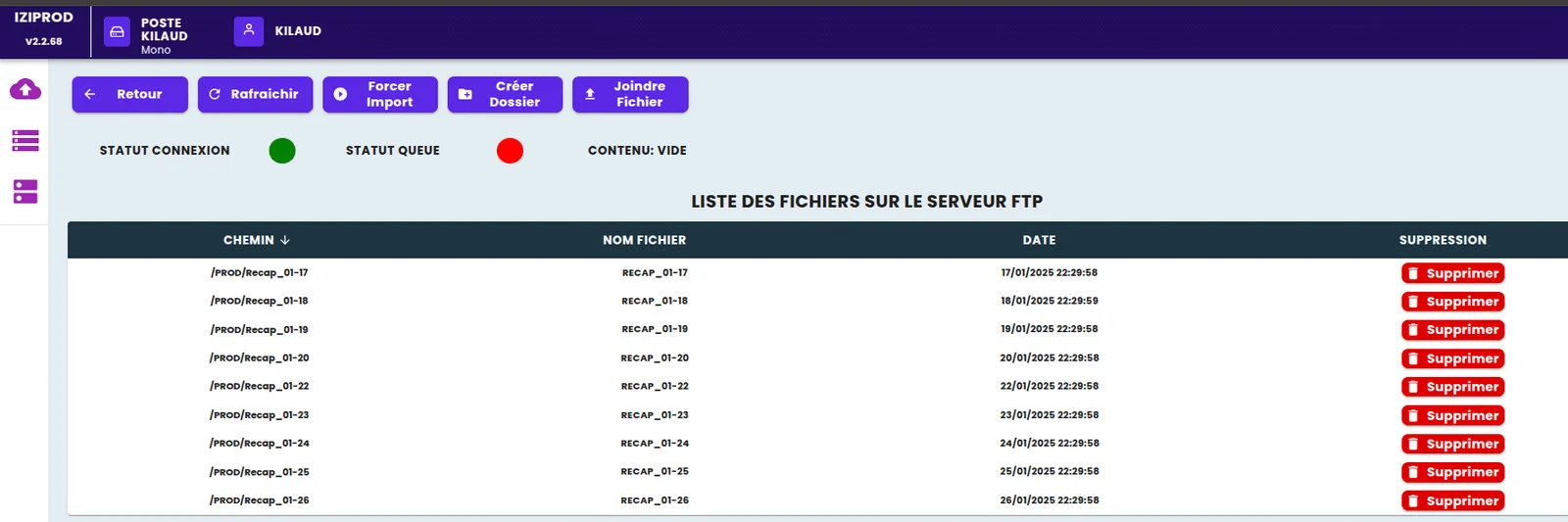
A second view displays, directly from the production software, the list of files on the SFTP server. A standard FTP client could have done the job, but this central screen avoids a separate login and answers the most frequent question: “has the file gone?”
Results of the SFTP integration
After a development phase marked by many connection problems with the SFTP server, the flow was stabilised and now runs without interruption. The shop floor works in the production software on the ERP's data, with no re-keying, and the ERP is kept informed of progress. Each time a business error comes up, a new check is added, with a message the ERP team can understand; that team now resolves integration problems without a developer having to step in every time.
What we take away from the SFTP integration
- A server you do not control is hard to diagnose. The connection incidents took a long time to resolve because the SFTP server was administered by a third party. Detailed logs on both sides and a named contact from the start would have saved time.
- The scheduled task must have only one runner. As the production software's API was replicated across several instances on AWS, the same task ran in parallel, causing duplicate processing, wasted resources and errors when deleting files that had already been deleted. The solution we recommend: trigger a single API route at each interval, for example from a Lambda function, to guarantee a single execution.
- Errors must speak the business language. Every check added with a clear message is one less call to the developer. That is what makes the interface last.
- A missing file matters as much as a file in error. Hence the screen that lists what is actually on the server.
The other possible methods (API, database) and how to choose between them are covered in the article connecting production software to an ERP.
And today: an ERP connection as standard
This need is covered as standard by Planitrack : time and operation tracking reads manufacturing orders, routings and items from the ERP, then sends actual times and quantities back to the ERP, with an exchange log the business team can consult. The Odoo connector is ready to use; for other ERPs, Planitrack is fed by files or by API, depending on what the ERP allows. Request a demo.