
Once the production plan is set, it still has to fit into the day: which manufacturing orders on which line, in what sequence, with which mould changes, and at what time each line will finish. That is what this short-term Excel scheduling project set out to do, in a poultry cutting and packing plant, alongside a medium-term planning workbook.
Background to the poultry scheduling project
The company is a large French poultry group, in the middle of a full integration of its information system. That programme takes years, so in the meantime a 200-person plant needed to structure its planning and scheduling quickly. The group chose a set of macro-enabled Excel workbooks: forecasting, long- and medium-term planning, and very short-term scheduling on the production lines.
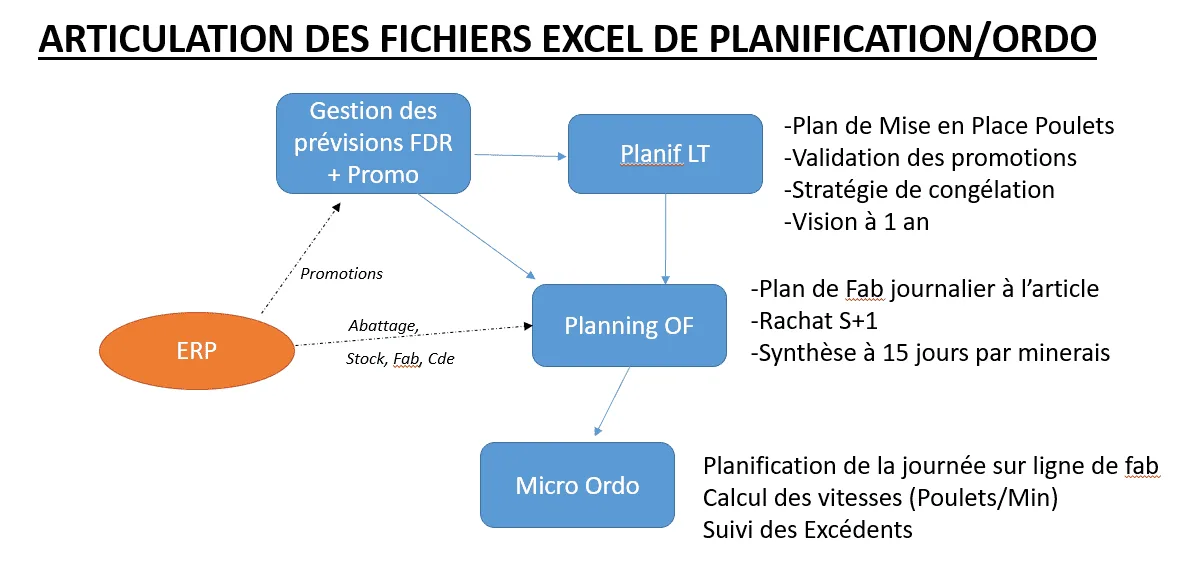
This case covers the scheduling workbook, called “Micro Ordo”. It receives the list of manufacturing orders decided in the medium-term planning workbook. The workbooks are not tied together by Excel links, which are slow and fragile, but by imports and exports.
The scheduling problem on the lines
In this workshop, the slaughter line sets the pace at the input, and each packing line has its own moulds, tray formats and machine rate. Placing orders without a method means more mould changes, one line overloaded while another waits, and a finish time for the workshop that only becomes known well into the day. The ERP's standard MRP, which proposes orders without knowing the moulds or the run rates, was not enough.
The scheduler therefore needed a tool to help decide the strategy for the day, then place orders line by line while seeing at once the finish times, the staff required and the balance of raw material.
What we built: short-term Excel scheduling, line by line
Step 1: import the orders and set the strategy
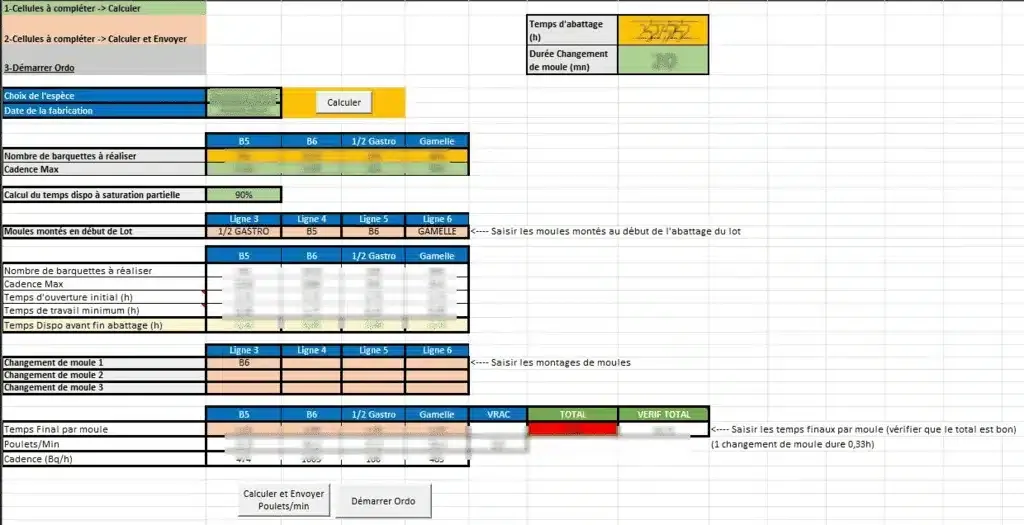
The scheduler imports the list of manufacturing orders from the plan. A summary sheet fills itself in and shows the points to decide:
- the moulds to fit at the start of production;
- the tray formats to run, so that mould changes can be anticipated;
- the number of chickens to slaughter, cut and pack in the time available, given the rate of the slaughter line at the input;
- the maximum machine capacities, compared with the number of trays to produce per mould format.
From there, the scheduler decides which mould changes to make and on which lines. This gives an effective production time per line, then the cutting rates in pieces per minute, set by mould type, then the packing rate. A final check confirms that these rates stay within machine capacity.
Step 2: place the orders on the lines
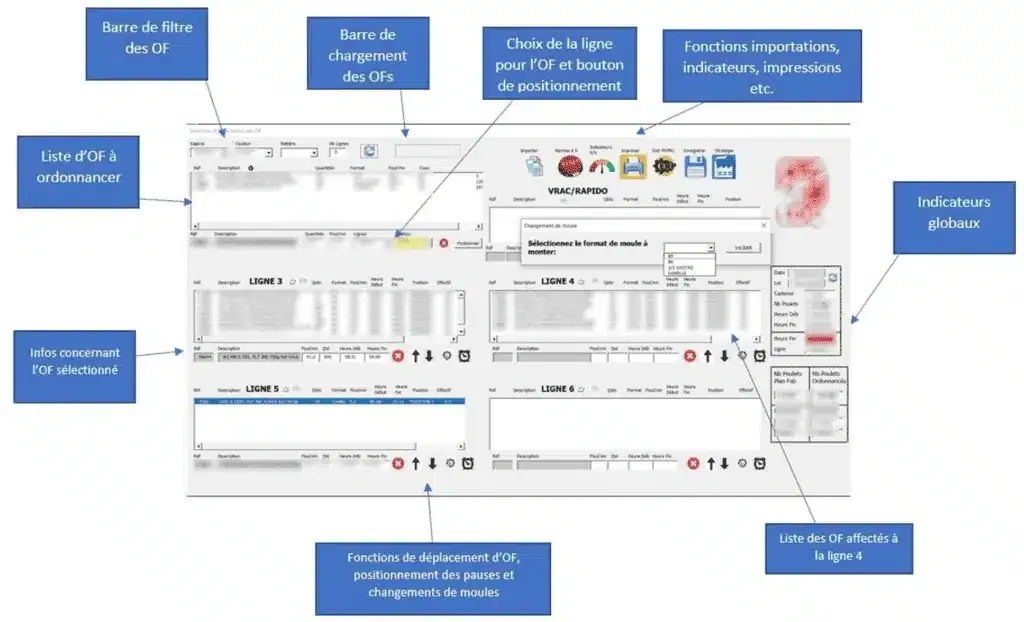
Orders are then placed one after another on each line. To set priorities, each order carries the stock cover of its item: the lower the cover, the more urgent the order. A full-screen view, built with a UserForm and VBA macros, was developed to make this work quick and easy to read. Each time an order is placed, the overall and detailed indicators are recalculated, along with the start and finish times of each workshop.
Functions delivered in the scheduling workbook
- import of the list of manufacturing orders created by medium-term planning;
- allocation of orders to lines with mould checks, and recording of breaks and mould changes;
- automatic calculation of each order's finish time and a summary of finish times per line;
- calculation of run rates per order and of the staff needed per line to deliver the production plan;
- monitoring of raw material imbalances between breasts and legs, thighs and drumsticks, at every order assignment;
- two orders handled at the same time on each line.
Results of the scheduling workbook
The gains were not quantified as part of this project; the results observed are organisational. Every morning the scheduler has an explicit strategy, with moulds, rates and staffing, before placing the first order. The finish time of each line is known as choices are made, instead of being discovered at the end of the day. Raw material imbalances are flagged at the moment of assignment, not afterwards. And the workbook fits into a complete chain, from forecasts through planning to scheduling, with no re-keying between the three.
What we take away from this scheduling project
Three lessons. First, short-term scheduling and medium-term planning are two jobs, with two tools and two rhythms: the plan decides quantities over fifteen days, scheduling decides the sequence within the day. Mixing them in one table makes both unreadable. Second, strategy comes before placement: until moulds, rates and capacities are set, placing orders just moves problems around. Finally, instant recalculation at every action is what gets the tool adopted; a finish time that updates with every order is worth more than a perfect report at the end of the day.
The limits are those of any macro workbook: dependence on its author, fragility in the face of handling errors, no simultaneous work and no history. We cover them in this article on Excel and the limits of ERP systems in planning.
And today: scheduling without VBA
What this workbook did in VBA, Planitrack does as standard on the shop floor: drag-and-drop scheduling of manufacturing orders, line by line, and real-time progress from barcode scans, which compare actual times with standard times. Upstream, Planiprod holds the medium-term plan, the projected stock and the requirements calculation, and passes the orders to the ERP, which remains the master. To see scheduling for a workshop like yours, arrange a demo or have a look at our projects.