
Applying stock cover targets produces, every day, a production plan that cannot be carried out: the raw material coming from slaughter never matches what sales require. This was the starting point of this short- and medium-term Excel planning project in the food industry, carried out in a poultry plant while waiting for a development in the group's ERP.
Background: a poultry plant that could not wait for the ERP
The company is a large French poultry group aiming to integrate all its flows into the ERP and business applications. A programme like that takes years, and a 200-person plant with six production lines needed to structure its planning straight away.
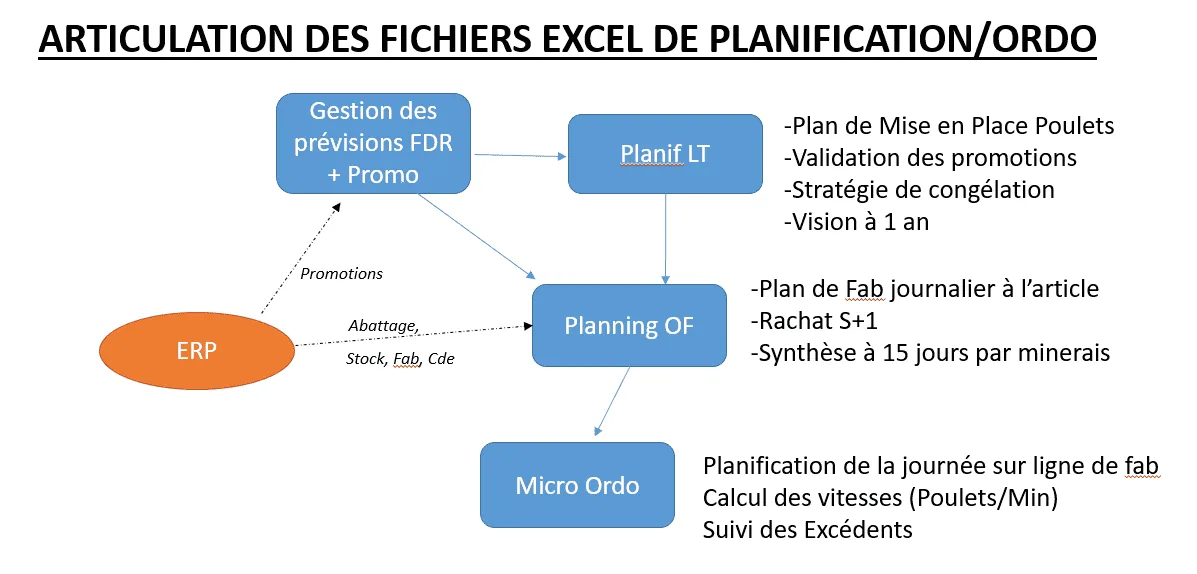
The group therefore chose an interim solution: macro-enabled Excel workbooks covering sales forecasting, long- and medium-term planning and very short-term line scheduling. This case presents the medium-term planning file, the “MO Plan” (short-term scheduling is covered in a separate case study).
The problem: a double constraint
Planning poultry means managing a double constraint. On one side, sales forecasts and stock cover targets define an ideal plan: for example 1.5 tonnes of legs and 2 tonnes of breast fillets from standard yellow chicken. On the other, slaughter delivers a quantity of raw material that does not depend on that plan. If there is too little, the plan is void; if there is too much, the very short use-by dates mean it must be sold quickly.
On top of this comes the imbalance in sales: one chicken gives two fillets and two legs, a promotion on fillets leaves a surplus of legs, and a leg is cut into a thigh and a drumstick, which do not sell at the same rate. Classic MRP, at infinite capacity and with no raw material constraint, was not enough; no ERP met this need properly.
What we built: short- and medium-term Excel planning for a food plant
Fifteen days, five columns per day
The file covers fifteen days, rolled forward every week. Each day shows five columns: opening stock, supplies, production, sales (actuals and forecasts combined) and closing stock for the day, with expandable sub-columns and saved views.
Imports with no re-keying
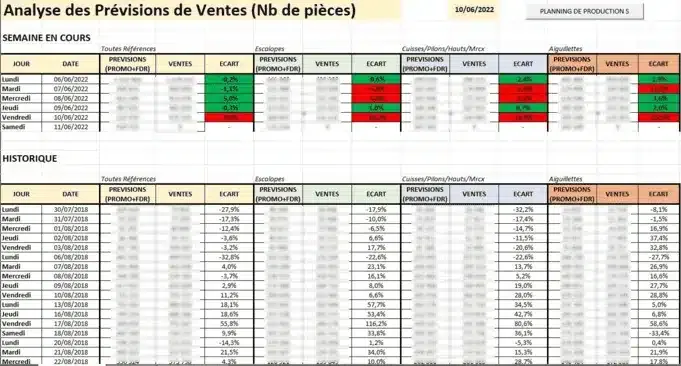
Sales forecasts are imported from the forecasting workbook. The slaughter plan, customer orders, opening stock and production in progress come from the ERP: with no direct access to the tables, the planner pastes an extraction into a tab, and a macro loads it into the plan almost instantly.
An explicit rule between forecasts and actual sales
For closing stock, the file takes the higher of the two values, actual sales or forecasts, up to a configurable time; after 10 am, actual sales are considered more reliable. A table compares sales with forecasts, and the planner can apply a coefficient to the baselines when sales fall short several days in a row.
The raw material constraint recalculated continuously
We ruled out an automatic production plan: tests showed that applying stock cover targets reference by reference always produces an unworkable plan, because it ignores raw material. Instead, a window above the table shows raw material availability and recalculates every second: with each quantity entered, the macro deducts the material required according to the bill of materials and updates what is available.
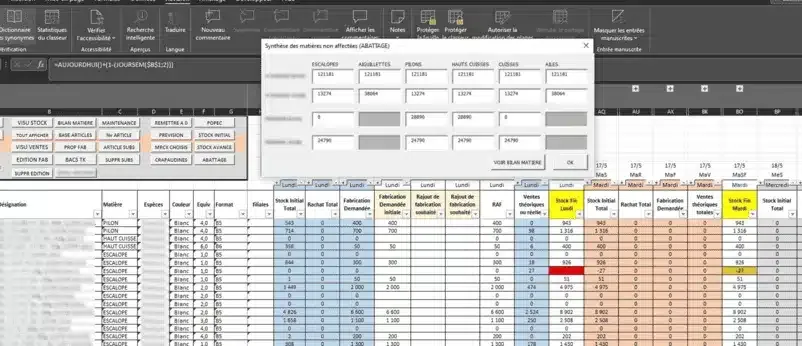
Two levers complete the set-up: the bill of materials for the “choice cuts” references (six pieces, in theory three thighs and three drumsticks) can be changed for a single day within the limits of the brand's specification; and material substitution allows a reference to be made from another raw material, or a requirement to be covered by another reference.
Material balance and outputs for the shop floor
A material balance gives the expected stock position by anatomical cut over fifteen days: it is the tool the planner uses to manage freezing, supplies and exports. On the output side, manufacturing orders go to the ERP as CSV files, and a paper listing sorted by a macro gives team leaders their view of the day.
Results in the plant
The file is used six days a week, from 7 am to 7 pm, by a main planner and a second planner, sometimes by a third person on Saturday mornings. It has been in service for more than two years, as the ERP has no equivalent. Since the material balance was introduced, steering errors have become much rarer. The users, who started with average Excel skills, now identify the cause of most macro blockages themselves.
Lessons from the planning workbook
A workbook on this scale is ambitious for such intensive use. Yet it met its objectives: firefighting, quickly testing a planning method, evolving it in an agile way and preparing the longer development in the group's ERP. When that development started, it took a video demonstration of the file to make the contractor understand that a classic MRP run would not do the job.
Robustness remains the limit: user errors and blocked macros in the first months, calls during holidays or when the main planners were absent. Hence our recommendations for a project of this kind: train users in Excel before the project, plan an intensive presence during the first month, organise long-term maintenance, never update Excel without testing first, and think about life after Excel from the start.
And today?
What this workbook did with macros, Planiprod does as standard: an MPS over fifteen days or more, projected stock by reference, raw material requirements calculated from bills of materials, the “maximum of actual sales and forecasts” rule written in a programmable column that explains itself, imports from the ERP every morning and manufacturing orders sent back to the ERP, which remains the master. To see how Planiprod reads your Excel MPS, get in touch for a demo or read through our case studies.